
PartsSaverF'z+ - Parts Library Management Environment
-
-
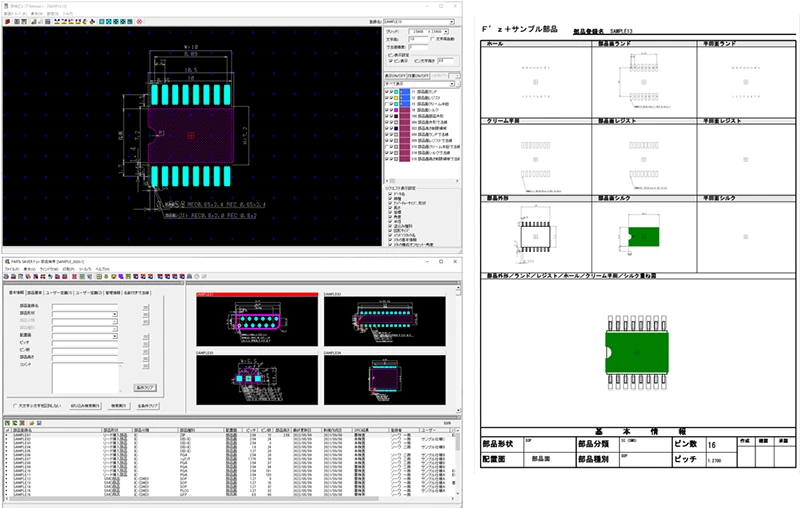
PartsSaverF'z+ is a data management system which has a Registration of the Parts library Information created by printed circuit design, and a search service, and it unites with all Parts library management environment by various CAD-interface functions.
PartsSaverF'z+_catalog.pdf
Summary
PartsSaverF'z+ is a data management system which has a Registration of the Parts library Information created by printed circuit design, and a search service, and it unites with all Parts library management environment by various CAD-interface functions.
Support of GUI which makes an appropriation design easy
PartsSaverF'z+ is always made being conscious of the Search of an Information.
Parts library already created by that cause is template-ized, and the shortest man day and the best quality are realized.
Convenient Search by a keyword
It has a Basic-Info control item which amounts to 50 pages, and can set it up freely.
Moreover, an output is possible for a Basic-Info control item to a CSV Format.
It is also possible to improve the appropriation efficiency by secondary elaborations of an Information, such as generation of an Import, a "bill of materials", a "net List", and a "CAM Data", to spreadsheet software.
Document creation function in which a Format Edit is possible
It can peruse anywhere by Parts Light Viewer (no charge) by a PLV file generating function (charge).
Moreover, by a "Part-registration-form-output function", a document can create in an instant and a paper format can be customized freely.
Interface to substrate design CAD with several kinds of track records
It has the various printed circuit design CAD interfaces of + ten or more kinds of Parts Saver F'z.
Parts library of a F'z+ can be managed in a unified manner by supplying various CAD.
Optional feature supports Footprint creation powerfully.
In a PartsSaverF'z+, it is a Parts library template creation function "FPG" (option), and the difference in a Pins or a Pad design rule is able to systematize the manual creation work by a cause completely.
- Define the Setup rule of a Pad required at the time of Parts library creation as a database, and generate a Parts library automatically in inputting the Dimension value and starting point Information on an appearance Item from a parts catalog.
- A design rule can be defined for every Parts kind, and sets up the calculation method of each generation Items (Land,Resist,etc.) using a Formula or a function.
Optional Feature
Interface which starts each function of a PartsSaverF'z+ from an external command is exhibited.
(Onerous option)
Cooperation function
It can cooperate the Add function and search service of a PartsSaverF'z+ from other systems.
Workflow (a request, an Approval, progress check etc...) and a footprint real data link.
Schedule batch processing
CAD data output, a PDF file output, Backup and the The update of data between servers, a DRC comprehensive inspection, etc can be performed from a command line.
Automatic processing is possible for fixed processing or the processing which requires a time at night.
Functional image
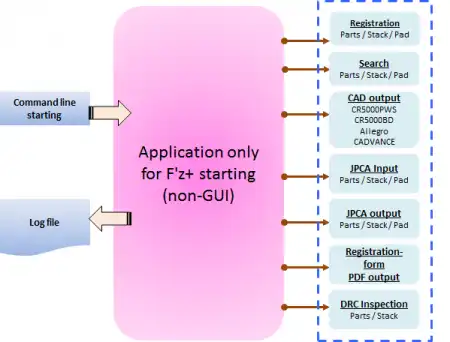
Main functional
Registration tool call function
Call of a Part registration, a Stack registration, and a Pad registration.
Search tool call function
Part Inform Result, a Stack Inform Result, and a Pad Inform Result are called.
It starts in the state, finishing [ an Inform-Result execution ], by passing a Requirement for Search.
It corresponds also to the Basic-Info CSV output of an Inform-Result.
CAD output tool call function
CR5000BD output, PWS output, Allegro output, and CADVANCE output are called.
JPCA tool call function
JPCA Input and a JPCA output are called.
It outputs and inputs by package by passing a Library-name List.
Rgistration-form-output call function
Call of a Registration form output.
PDF file is created.
DRC inspection call function
Call of a DRC inspection.
Parts inspection and stack testing are performed.
- Connect the inquiry about this optional feature to business or support.
FAQ
PartsSaverF'z+
| Q | About a corresponding CAD system |
|---|---|
| A |
*: Ask for details. *: Various ASCII input-and-output software currently sold by the appearance like a CAD vendor is required. *: All the brand names indicated are the trademarks and registered trademarks of each company. |
| Q | About a hardware requirement |
|---|---|
| A | Hardware requirement of recommendation CPU: More than 1GHz (recommendation) Memory: More than 1GB (recommendation) OS: Windows Vista/Windows 7 RDB: Orale11g Windows Vista Business: Oracle11g Windows 7: Oracle11g database |
| Q | About a license form |
|---|---|
| A |
|
| Q | About a means to import the Parts library in CAD to a PartsSaverF'z+ |
|---|---|
| A |
|
| Q | About the contents of the onerous maintenance contract |
|---|---|
| A |
*: About the restoration and correspondence accompanied by the business trip of SE, expense may occur separately. |
Case
Case1
| Purpose | Increase in efficiency of the manufacture plan by standardization of a Parts library |
|---|---|
| Contents |
From a manufacturing department without CAD, it lets a circuit designer pass and supplies a Parts library to a subcontract cooperation maker. By a subcontract maker's unification Parts library use, it is a sizable cut about the correction time of a mounting Data. |
Case2
| Purpose | Increase in efficiency of DR (design review) by the indication of a Parts library Style. |
|---|---|
| Contents |
A Style, a Height Information, etc. on electronic components are disclosed to a section without CAD. It is a sizable cut about DR man day which starts position examination of mechanism Parts and electronic components in the development process of goods which a miniaturization follows. |
Case3
| Purpose | Time shortening and improved quality by Parts library provision to a subcontract cooperation maker |
|---|---|
| Contents |
One set provision of the Parts library to a subcontract cooperation maker. Improvement in the quality by reduction of a printed circuit design man day and use of a track record Data was aimed at. |
Case4
| Purpose | Parts-specifications indication by PDF-izing of a Part registration form. |
|---|---|
| Contents |
A Parts library Style is specifications-ized and it is PDF-ization. By carrying out information control in WEB, a package Information, a Parts Attribute Information, a library Style Information, a materials Information, etc. were managed in a unified manner, and reduction of the investigation man day was aimed at. |
Case5
| Purpose | Unified-management-izing of the Parts library of two or more CAD |
|---|---|
| Contents |
When two or more sorts of CAD is being employed, a Parts library Registration / Management is unified. The whole increase in efficiency by reduction of the introductory number of CAD, Part-registration / administrators' reduction, and exclusion of a Duplication Registration was attained. |